Private beta for macOS

Build an AI teammate for the work you need done.

Describe the job. Ownware Studio creates a named teammate with a desk where its instructions, context, memory, tools and activity stay together — on your Mac. Run it when needed or on a local schedule while Ownware Studio is open. You choose the model and permissions; scheduled drafts wait for approval.

+48 more example jobs →
Ownware Studio · Today Current product
Google CalendarGoogle Calendar GmailGmail · planned SlackSlack · planned BrowserBrowser Google DriveGoogle Drive · planned NotionNotion · planned LinkedInLinkedIn · planned GranolaGranola · planned +Planned connections
The job, its context, memory, tools and activity remain together in one working desk.

Different jobs. One lasting way of working.

Ask once, return whenever the job comes up, or put it on a local schedule. Each teammate keeps the job’s instructions and working context together, uses only approved tools, and shows you what it did. Browser and Calendar work today; examples using other apps show planned connections. These are starting points, not a fixed catalog: describe the job you need and Ownware Studio builds around it.

Eve
Morning Briefer

Delivers one clear view of today’s meetings, messages and priorities.

Google Calendar Gmail Slack Browser 4 tools
Mira
Meeting Prep

Turns meeting history, people and recent news into a useful prep brief.

Google Calendar Browser Gmail Granola 4 tools
Alex
Inbox Prioritizer

Separates messages that need a decision, a reply or no attention yet.

Gmail Slack Google Calendar 3 tools
June
Decision Researcher

Builds an evidence-backed case for and against an important decision.

Browser Google Drive Gmail Slack 4 tools
Rowan
Investor Update Writer

Turns metrics, progress, risks and asks into a review-ready update.

Google Sheets Google Drive Gmail Notion 4 tools
Sia
Board Pack Coordinator

Keeps board materials, missing inputs and deadlines in one clear view.

Google Drive Google Sheets Notion Google Calendar 4 tools
Cole
Partnership Researcher

Turns company and relationship research into an actionable partner brief.

Browser LinkedIn Salesforce Gmail 4 tools
Amara
Weekly Reviewer

Turns a scattered week into wins, decisions, risks and next steps.

Google Calendar Slack Notion Google Sheets 4 tools
Don’t see the job? Describe it.
Ownware Studio asks about the outcome, context, tools and limits, then creates a lasting desk for the job.
Describe your job

Start with one teammate. Add coordination later.

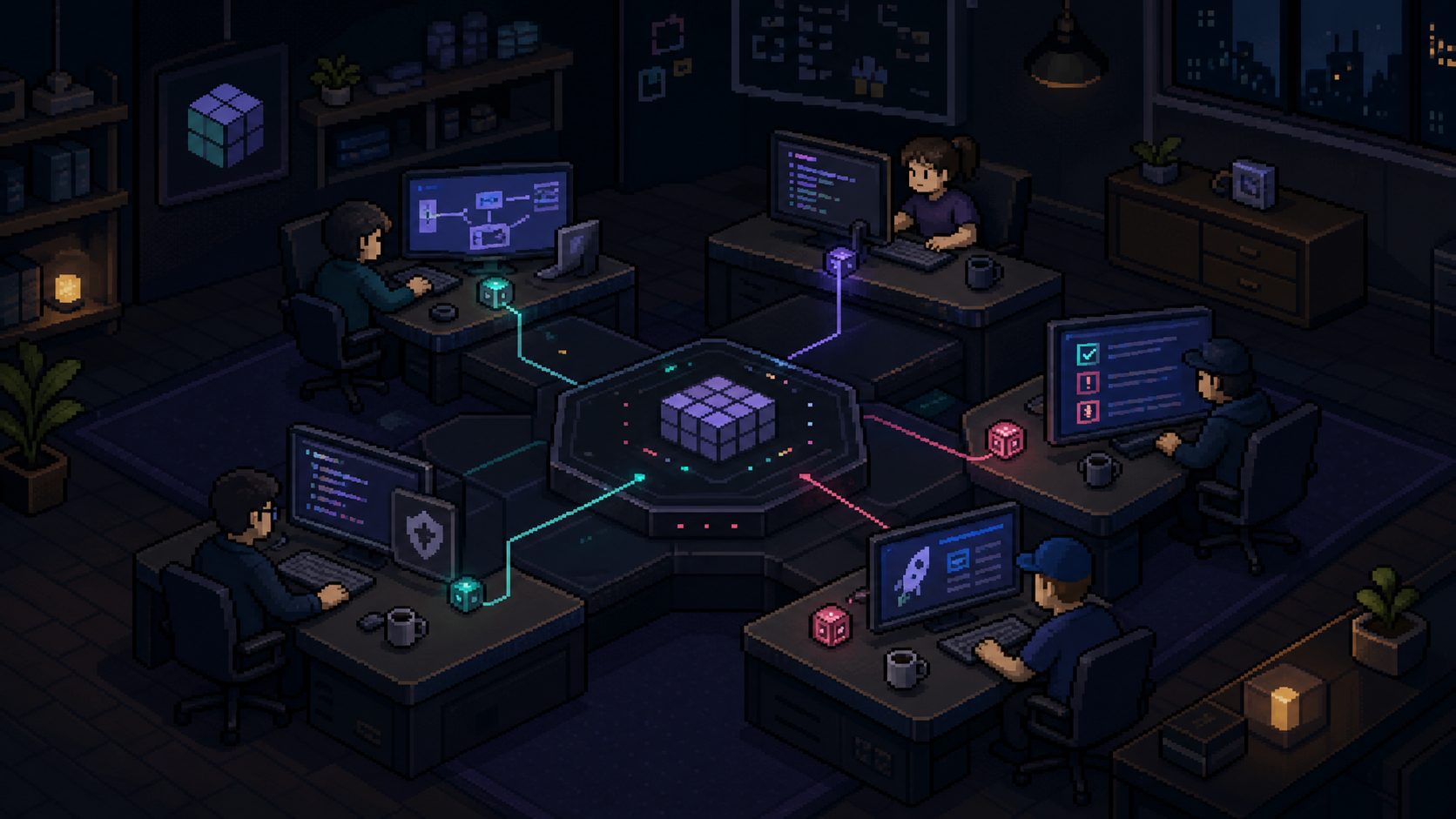
Today, Ownware Studio gives one named teammate a durable desk for its job. The Team layer in development will let several specialists share one outcome, with context and handoffs kept visible. Here is the roadmap concept:

Roadmap preview LAUNCH-01 Australia market brief
Pixel-art concept of five Ownware Studio specialists working around one shared business brief.
  1. 01 Juno · Strategist Defines the objective
  2. 02 Vera · Researcher Gathers the evidence
  3. 03 Mira · Coordinator Organises the brief
  4. 04 Idris · Reviewer Checks the assumptions
  5. 05 Iris · Editor Prepares the final brief

One outcome stays on the table. Sources, decisions, drafts and evidence travel together, while every teammate keeps its own instructions, tools and working style.

Not in today’s betaThis shows the intended model — coordinated handoffs are in development.

One working desk today. More specialist views later.

The Ownware Studio desk shown at the top is the current product. The Coder, Design and Marketing screens below are roadmap previews of how a desk could adapt to specialist work.

Roadmap only: Coder, Design and Marketing are not part of today’s beta. The general Ownware Studio desk shown above is available now.

The job stays visible — not buried in another chat.

Chat gives you an answer and automation follows predefined steps. Ownware Studio gives the job a lasting home: its objective, context, sources, activity and approvals remain together. Today that begins with one teammate; the preview below shows how the same model can expand to a coordinated team.

Job, not prompt

The responsibility stays defined instead of disappearing into a conversation.

Durable context

The project, decisions and handoffs remain attached to the work.

Human control

You can inspect progress, change direction and decide what gets approved.

Give each teammate only the tools its job needs.

Calendar and Browser are already part of the Ownware Studio desk. A broader managed integration layer is in development, designed to add company apps through explicit permissions while keeping the resulting work visible in one place.

Calendar today · broader managed integrations Rollout in development
  • Calendar
  • Gmail
  • Slack
  • GitHub

Ownware Studio connector runtime

One permissioned path into the job. Designed around an isolated connector project for each Ownware Studio account. Powered by Composio
  • Linear
  • Notion
  • Outlook
  • Teams
Available today: Calendar and Browser in the Ownware Studio desk. The additional apps shown above belong to the managed rollout. The broader Composio catalog covers 1,000+ tools; availability, authentication and third-party pricing vary by app.
01

Browser → Evidence Research the web and keep sources beside the result.

02

Calendar → Context Bring upcoming work and meetings into the desk.

03

Connected apps → Delivery Planned connections will bring in sources and deliver approved work.

Own the software. Choose the AI bill.

Ownware Studio runs on your Mac today, so model usage does not need to be hidden inside a monthly Ownware Studio plan. Bring your own provider, choose the model behind each agent, and pay that provider only when the agent works.

Use it once, when needed, or on a schedule.

The current desk and local working loop are marked V1 today. Broader integrations, coordinated Teams and always-on cloud work remain clearly labelled.

V1 · Today V1 · In development V2 · Planned
V1 · Today

Build one teammate and keep the job together.

Shape the role, choose its model and permissions, and work with Browser and Calendar. Run the job when needed or schedule it while Ownware Studio is open, inspect its history, and review held drafts before consequential action.

V1 · In development

Form a Team around one goal.

Keep the plan, subgoals, progress, handoffs and review visible across a roster of teammates.

V2 · Planned

Move it to your own cloud. 24/7.

Deploy the same engine into infrastructure you own for always-on work after the Mac closes — your account, your cloud bill.

Exploring · not available today

Talk to it from anywhere

Chat with your teammates and approve their work from your phone, Slack or the web — the desk stays on your machine.

Work that starts itself

“When a deal closes, when a form lands, when an email arrives” — event triggers, not just calendar cadence.

Blueprint marketplace

Install any of the 56 teammates in one click, and share the ones you build with your team.

Teammates that learn by watching

Show it the job once — it drafts its own instructions, and every edit you make teaches it your voice and standards.

Compiled routines

Work a teammate has mastered compiles into a deterministic routine — near-zero tokens, the same result every time. Intelligence once, execution forever.

Rehearsal mode

Before you hand over a tool, watch the teammate rehearse the job read-only — see exactly what it would have sent, then grant the keys.

100 licenses only · opening after the private beta

Founding 100

The first 100 paid customers receive a lifetime license to the core Ownware Studio desktop product and the announced operating layers above as they are released.

$99 USD
one payment

Yours today

  • Agent Builder, desk, model permissions and approval holds
  • Browser, Calendar, local schedules and run history
  • One personal account on up to two Macs

Included as they ship

  • Teams, broader integrations and specialist desks
  • Customer-owned cloud deployment (V2)
  • All core desktop upgrades — no version fees
Request beta access

No payment today. The private beta remains free while we finish and verify the paid release path — and paid launch opens with a seven-day full trial, no card required.

What “lifetime” covers: the core Ownware Studio software for as long as it is offered and supported. Model usage, taxes, cloud hosting, paid connected-app plans and high-volume third-party services are not included. And because Ownware Studio runs on your Mac, the software you bought keeps working even if the company doesn’t — there is no server side to switch off.

The job stays yours.

Teammate profiles, conversations and project state live in one folder on your Mac. Model requests go directly from your Mac to the provider you choose — there is no Ownware Studio server in between. Any brain works: Anthropic, OpenAI and Google directly, or hundreds more through OpenRouter.

~/.ownware
├─ teammates/      profiles, memory, routines
├─ conversations/  every thread, searchable
├─ projects/       files, briefs, decisions
└─ credentials/    your model key · encrypted
your Macyour model providerno middleman server

Questions, answered plainly.

Is it Mac only?
Today, yes. The private beta ships as a Mac desktop app. A bring-your-own-cloud version is planned for teams that want to run Ownware Studio on infrastructure they own.
What can I use today?
The current private beta includes Agent Builder, the Ownware Studio desk, durable local state, Browser, Calendar, model and permission choice, run history, local schedules while Ownware Studio is open, and approval holds for scheduled drafts. Broader integrations, coordinated Teams and specialist desks are not available yet.
Which AI model does it use?
Your choice. Ownware Studio currently curates agent-ready OpenRouter models from Moonshot, DeepSeek, Z.AI, xAI and Anthropic, and it also supports direct Anthropic, OpenAI and Google accounts. The wider OpenRouter directory contains hundreds of models; Ownware Studio keeps its default picker focused on models we intend to test for real agent work.
Are the integrations available now?
Calendar and Browser are available today inside the Ownware Studio desk. The broader managed integration layer is in development. It is designed to provision an isolated connector project for each account; additional apps will be announced as they pass permission and reliability testing.
Does it work offline?
The app and project state live locally. Asking a teammate to think still calls your chosen model provider, so that part needs a connection unless you use a local model.
Where does my data live?
Ownware Studio stores its profiles, conversations and project state under ~/.ownware. Model requests go from your Mac to the provider configured with your key.
What does it cost?
The private beta is free. At paid launch, the first 100 customers are planned to receive a Founding License for $99 USD once, after a seven-day no-card trial. AI usage is billed separately by the model provider you connect.
How is Ownware Studio different from chat or automation?
Chat is usually a conversation you must restart and automation requires you to define the steps. Ownware Studio gives a responsibility a lasting desk: its instructions, context, memory, tools, activity and approvals stay together. You can still ask for one-off work or place the job on a local schedule.
What does a lifetime Founding License mean?
It means access to the core Ownware Studio software, the announced operating layers on this page as they are released, and future core upgrades for as long as Ownware Studio is offered and supported. It does not mean unlimited AI, OpenRouter credit, cloud hosting or unlimited paid third-party services.
When do invites go out?
In small waves. Apply with the first job you would give a teammate; we read every request and invite the use cases that will teach us the most.

Give the job a desk of its own.

Ownware Studio is in private beta for macOS. Tell us the first job you would give a teammate and what you would trust it to do.

Private beta · Founding 100 comes next

Request beta access.

Tell us about the first job you would give an Ownware Studio teammate and what you would trust it to do. A real person reads every request.

  1. 01
    Describe the jobName the outcome, context and working style.
  2. 02
    Open its deskKeep instructions, memory and activity together.
  3. 03
    Set the controlChoose the model, tools and permissions.
Please add your name.
Please add a valid email.
Solo founder Small-team founder Marketing / growth Agency / consultant Sales / customer success Operations Product / research Something else
Pick the one that fits best.
Tell us about the first job you would give a teammate.

Request received.

Thanks — we read every one. If you're a fit for the next wave, you'll hear from us at the email you gave.